ジュニアデザイナー評価指標 テンプレート
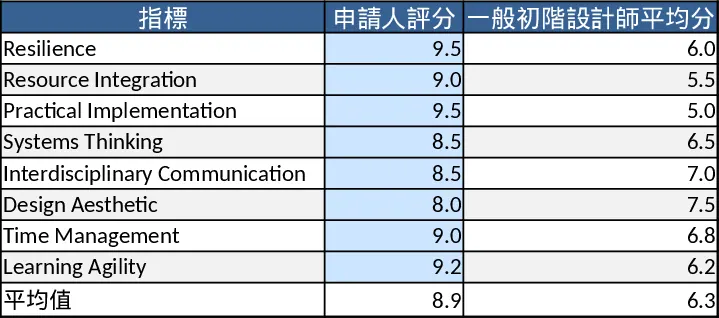
This Excel template is built for HR managers and design team leads who need a structured way to assess junior designers. It contains three main sheets: an Input sheet where you record the designer’s name, role, review period and score each of the five key indicators – Resilience, Resource Integration, Practical Implementation, Systems Thinking, and Interdisciplinary Communication – using a 1‑10 dropdown; a Data sheet that stores every entry automatically, ready for trend analysis; and a Dashboard sheet that pulls the latest data into a concise summary table, a radar chart, and weighted overall scores. Optional columns let you log achievements such as patents, awards, or budget‑constrained projects, giving a fuller picture of each designer’s contributions.
The template solves the common problem of subjective, ad‑hoc performance reviews by turning qualitative observations into quantifiable scores. It helps you spot strengths and development gaps at a glance, supports fair promotion or training decisions, and creates a historical record that can be referenced in future reviews or hiring cycles. By visualising the data in charts and summary tables, you reduce the time spent compiling separate reports and gain confidence that your evaluations are data‑driven.
Designed for HR professionals, design managers, project leads, and even freelancers who want to benchmark their own work, the template works best during annual reviews, post‑project debriefs, or when preparing promotion dossiers. It tracks each designer’s resilience under pressure, ability to integrate resources across multiple jobs, hands‑on implementation skill, systematic thinking, and cross‑disciplinary communication – all critical for success in fast‑paced design environments.
How to use
- Open the workbook and go to the Input sheet. Select the designer, enter the review period, and fill in each metric using the dropdown list (1‑10). Add any notes or achievement details in the optional fields.
- The template automatically logs the entry in the Data sheet; you don’t need to edit anything there.
- Switch to the Dashboard sheet to see the updated radar chart, overall score, and a quick‑look summary of strengths and areas for improvement.
- Export the dashboard as PDF or share the workbook with stakeholders for transparent review.
Expected benefits: You’ll spend far less time assembling manual performance reports and get an instant visual snapshot of each junior designer’s capabilities, helping you make faster, more informed talent decisions.