カラーコード出欠管理ダッシュボード テンプレート
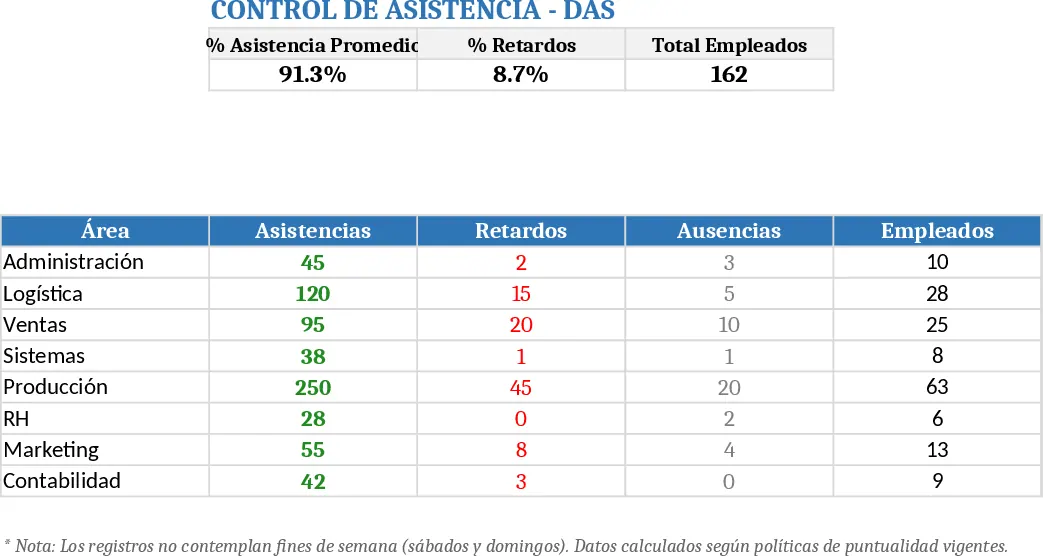
The Attendance & Tardiness Dashboard template is built on a single Excel workbook with three main sheets. The Data sheet contains a table for each work area where rows represent employees and columns represent dates. Cells are colour‑coded – green for on‑time arrivals, red for late arrivals or missing punches, and gray for full‑day absences. A small drop‑down list lets you select the status instead of manually colouring, and conditional formatting keeps the visual cues consistent. The Summary sheet pulls the raw data into pivot tables and charts, showing total hours present, percentage of late arrivals, and daily absence trends. A final Dashboard sheet consolidates these charts into a clean, at‑a‑glance view that updates automatically.
This template solves the common headache of manually counting attendance sheets and reconciling late‑arrival logs. By automating the aggregation and visualisation, HR managers can instantly spot chronic lateness, identify days with high absenteeism, and generate reports for payroll or compliance without extra calculations. The colour‑coded layout also makes it easy for supervisors to enter data quickly during daily roll‑calls, reducing errors and saving the time usually spent on paper‑based registers.
Ideal for small‑to‑medium businesses, schools, or any organisation that needs to monitor daily presence across multiple departments. It works best when attendance is recorded daily, either by supervisors marking the cells or by importing punch‑card exports that match the template’s layout. The dashboard is especially useful during audit periods, when managers need to present clear evidence of attendance patterns to senior leadership.
How to use
- Open the Data sheet and enter the list of employees for each area; the template already includes a date row for the current month.
- For each day, select the appropriate status from the drop‑down (On‑time, Late, Absent) – the cell will turn green, red, or gray automatically.
- After updating the data, go to the Dashboard sheet and click Refresh All to update the pivot tables and charts.
- Review the visual summary to see overall attendance rates, late‑arrival percentages, and any spikes in absences.
Expected benefits: reduces manual tallying, improves data accuracy, and provides instant visual insights, freeing up HR time for strategic tasks.