地域別子宮頸がん発生率とリスク要因ダッシュボード テンプレート
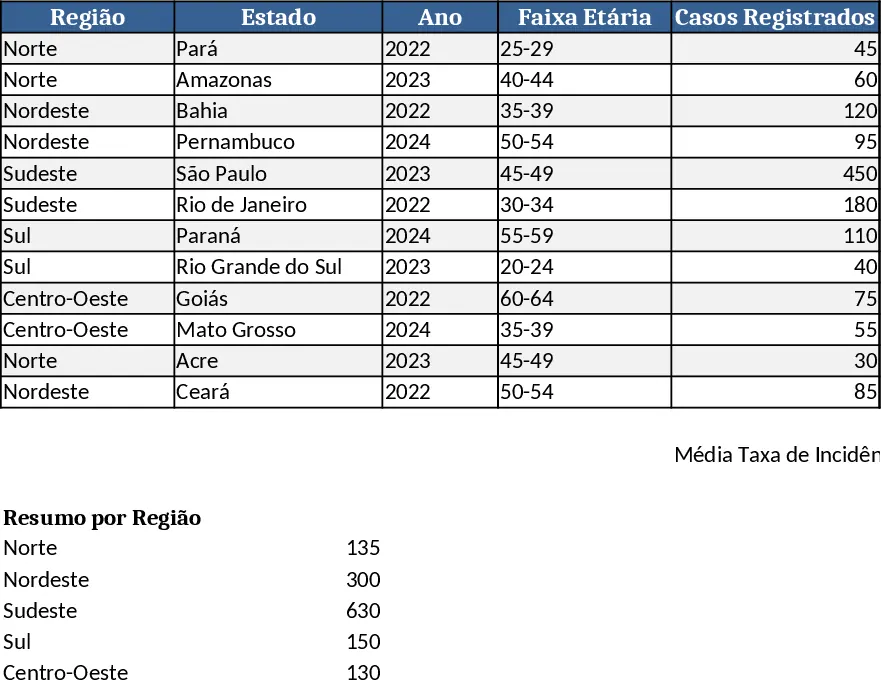
The template is built around four worksheets that keep the workflow tidy and repeatable. The Data Import sheet holds raw tables downloaded from SUS and INCA, with columns for year, state, region, age group, risk factor and reported cases. The Parameters sheet contains dropdown menus for selecting a region (North, Northeast, South, etc.) or a specific state such as Pará, and for choosing the chart style you want to display. The Charts sheet automatically generates column, line and pie charts for the national view, the chosen region, and the selected state, pulling the latest numbers from the data sheet. Finally, the Summary sheet aggregates key metrics – total cases, incidence per 100 000 women, top age groups and most common risk factors – and presents them in a compact table that can be copied into reports.
This workbook solves the time‑consuming task of gathering, cleaning and visualising epidemiological data for cervical cancer in Brazil. By linking directly to the official SUS and INCA datasets, it eliminates manual copy‑pasting and reduces the risk of transcription errors. Users can instantly see how incidence varies across regions, spot age groups with higher rates, and compare risk‑factor profiles, which helps public‑health planners allocate resources, design targeted screening campaigns and communicate findings to stakeholders.
The template is ideal for health‑department analysts, epidemiologists, NGOs working on women’s health, and academic researchers who need a quick, reliable visual overview of cervical cancer trends. It tracks incidence counts, age distribution, regional differences, and the contribution of known risk factors such as HPV prevalence, smoking and socioeconomic status. The built‑in charts make it easy to create presentation‑ready graphics without learning a separate visualisation tool.
How to use
- Open the workbook and go to the Data Import sheet; click the Refresh button or paste the latest CSV files from SUS/INCA into the highlighted area.
- Switch to the Parameters sheet and pick the desired region or the state of Pará from the dropdown menus; optionally select the chart type you prefer.
- Navigate to the Charts sheet; the column, line and pie charts update automatically to reflect your selections, showing both national and regional perspectives.
- Export any chart as an image or copy the Summary table to include in reports, presentations or policy briefs.
Expected benefits: you’ll save hours that would otherwise be spent gathering and formatting data, and you’ll have ready‑to‑use visualisations that make complex epidemiological information easy to understand.