기업 다중 프로젝트 관리 대시보드 템플릿
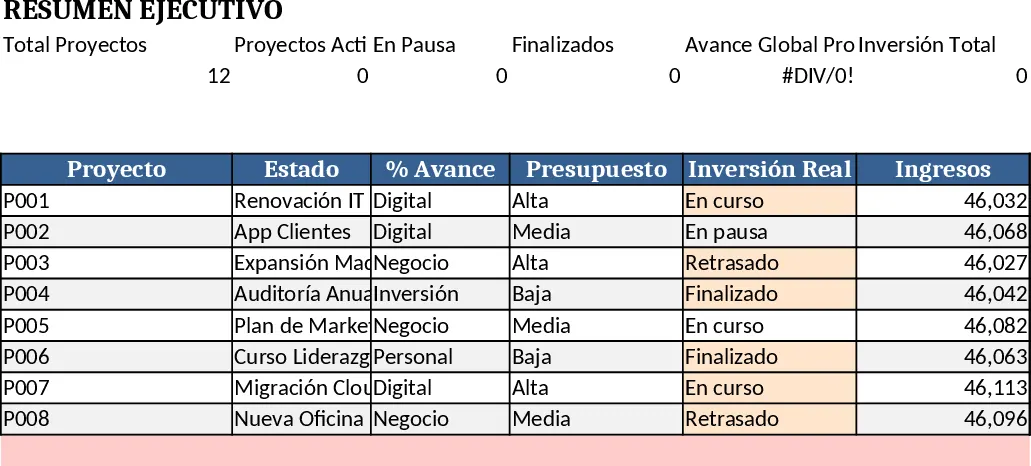
This Excel workbook is built for organisations that need to run several projects at once while keeping a clear, strategic view of performance. It contains three main sheets – a Dashboard General, a Base de Proyectos, and a Plantilla Proyecto that you duplicate for every new initiative. The dashboard pulls data from every project sheet and shows key indicators such as total projects, active vs paused vs finished, average progress, total investment, total revenue and overall ROI. A consolidated table lists each project’s name, status, % complete, budget, actual spend, income, ROI, estimated finish date and priority, and visual charts highlight progress distribution and project health. Alerts turn red when a project is delayed or over budget, while green bars display on‑track items.
Each project sheet follows a consistent layout. The General Information block captures name, objective, status (dropdown), priority, start and end dates, and responsible owner. The Planning table lets you break the work into phases and activities, automatically calculating duration and handling dependencies. The Task Management table records every task, its status, priority, assignee, due date and completion %; conditional formatting colours rows green, yellow or red. An automatic summary calculates overall project % complete, completed vs pending tasks and any days of delay. The Financial Control section records estimated and actual amounts for each cost or revenue line, then rolls up total investment, total income, profit and ROI. All numbers are linked back to the dashboard, so a single change updates every view.
The template solves the common pain of scattered spreadsheets, manual consolidation and missed deadlines. By centralising data entry, you eliminate duplicate work and reduce the risk of inconsistent figures. Real‑time KPI calculations give senior managers instant insight into portfolio health, while project owners can see at a glance whether they are on schedule and within budget. The built‑in dropdowns, data validation and conditional formatting keep entries clean and enforce company standards. It is ideal for PMOs, project managers, finance analysts and any team that needs to monitor multiple initiatives without building a custom system.
How to use
- Open the Base de Proyectos sheet and enter a row for each new project – ID, name, category, priority, status, start/end dates and responsible person. The dropdowns ensure consistent terminology.
- Right‑click the Plantilla Proyecto tab, choose Move or Copy, tick Create a copy, and rename the new sheet to the project’s name. Fill in the General Information, Planning, Task Management and Financial Control tables. All formulas and progress bars work automatically.
- Return to the Dashboard General sheet; the consolidated table, charts and KPI cards refresh instantly, reflecting the data you just entered.
- Use the visual alerts to spot projects that are delayed or over budget, then drill down into the corresponding project sheet to adjust tasks or re‑allocate resources.
Expected benefits – you’ll spend far less time gathering data, enjoy a single source of truth for project performance, and gain faster, more reliable insights that help you keep projects on track and within budget.