철근콘크리트 보 강화 워크플로 템플릿
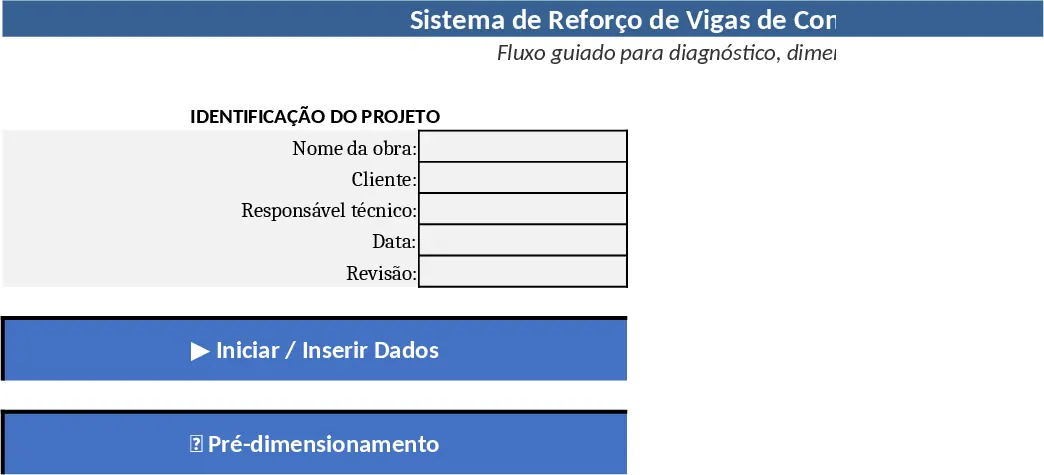
Sistema de Reforço de Vigas 템플릿은 일반 워크북을 철근콘크리트 보 작업을 위한 가벼운 프로젝트 관리 앱으로 변환합니다. 첫 번째 시트인 00_Início – Estrutura Proposta는 진입 포털 역할을 합니다. 상단에는 제목과 부제가 포함된 명확한 헤더가 있고, 왼쪽에는 프로젝트 식별 블록(작업명, 클라이언트, 기술 책임자, 날짜, 개정)이 배치됩니다. 모든 필드는 수동 입력 전용이며 숨겨진 수식이 없으므로 팀이 기본 데이터를 빠르게 입력할 수 있습니다.
식별 블록 아래에는 현재 프로젝트 단계가 표시되는 Status do Processo 박스가 있습니다. 초기에는 적절한 상태를 체크합니다(예: "Dados não inseridos", "Diagnóstico pendente", "Dimensionamento em andamento", "Verificação concluída"). 향후 버전에서는 셀 값을 기반으로 자동화할 수 있지만, 수동 업데이트만으로도 진행 상황을 시각적으로 확인할 수 있습니다. 시트의 핵심은 Fluxo de Navegação으로, 01_Entrada de Dados, 02_Diagnóstico, 03_Pré‑dimensionamento, 04_Dimensionamento로 연결되는 크고 색상이 다른 버튼들입니다. 버튼을 클릭하면 해당 섹션으로 이동하여 간단한 앱 같은 느낌을 줍니다.
이 템플릿은 구조 설계 사무소에서 흔히 발생하는 엑셀 파일 분산 문제를 해결합니다. 초기 데이터 수집부터 최종 검증까지 모든 단계를 중앙화함으로써 모든 팀원이 동일한 순서를 따르고, 중복 작업을 줄이며, 인계 과정을 투명하게 합니다. 엔지니어는 보 설계가 어느 단계에 있는지, 어떤 정보가 누락되었는지, 다음에 어디에 집중해야 하는지를 즉시 확인할 수 있습니다. 프로젝트 매니저는 여러 시트를 뒤져야 하는 번거로움 없이 진행 상황을 보고할 수 있는 단일 대시보드를 활용하고, 고위 검토자는 일관된 형식으로 계산을 검토할 수 있습니다.
How to use
- Fill the project header on the 00_Início sheet – enter the work name, client, responsible engineer, date and revision. No formulas are involved, so just type the information.
- Press “Iniciar / Inserir Dados” to jump to the 01_Entrada de Dados sheet. Populate all required geometric and material parameters for each beam.
- Move to “Ir para Diagnóstico” once data is complete. The diagnosis sheet will flag any missing or out‑of‑range values and suggest corrective actions.
- Proceed through Pré‑dimensionamento and Dimensionamento using the navigation buttons. Each sheet contains pre‑built calculation tables that automatically compute required reinforcement areas, check shear and flexure capacities, and generate a concise summary.
When you finish the dimensioning step, return to the 00_Início sheet and update the status box to "Verificação concluída". The dashboard now reflects a completed project ready for reporting.
Expected benefits: the guided flow cuts down on time spent searching for the right sheet, minimizes data entry errors, and provides a clear visual status for all stakeholders, making the reinforcement design process smoother and more accountable.