Production Launch Schedule with Gantt Chart Template
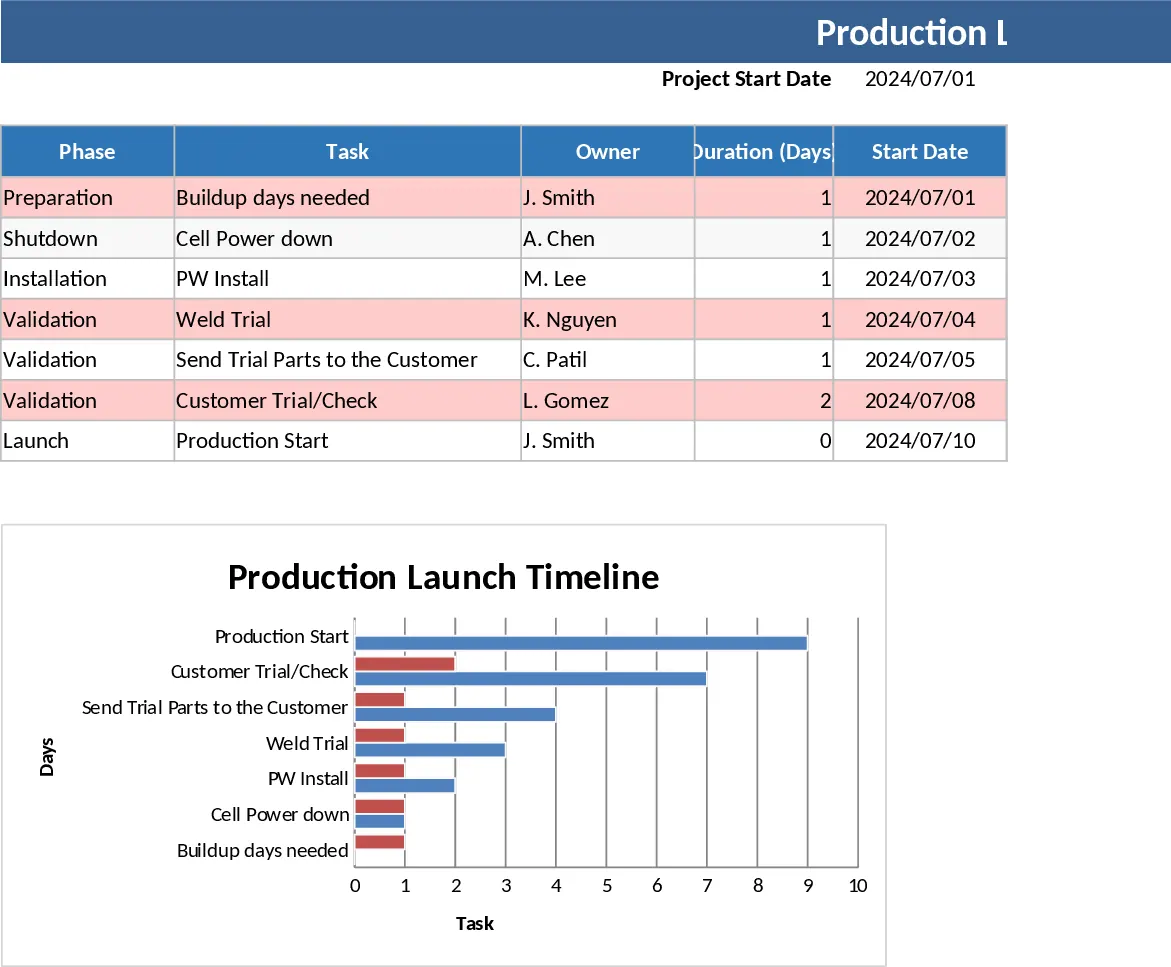
The Production Launch Schedule and Gantt Chart template is a sophisticated project management tool designed to bridge the gap between complex manufacturing planning and clear visual execution. At its core, the template is built around a dynamic scheduling engine that uses the Excel WORKDAY function to ensure all project milestones are realistic and exclude non-working days. The structure is centered on a primary data table where you can define phases, specific tasks, and assign ownership. Key fields such as Duration, Start Offset, and Critical Path indicators allow for a granular level of control over the project lifecycle, while the automated Gantt chart provides a high-level summary that is perfect for management reviews and stakeholder updates.
This template is particularly effective for solving the common problem of 'cascading delays.' In traditional static spreadsheets, changing one date requires manually updating every subsequent task. This template solves that by linking every task to a single Project Start Date. When the start date or a specific task duration changes, the entire timeline—including the Gantt chart—updates instantaneously. This ensures that your team is always working from the most current data, reducing the risk of miscommunication during high-pressure launch windows. It is an ideal solution for plant managers, launch engineers, and project coordinators who need to manage equipment installations, validation trials, and customer check-offs with precision.
Beyond simple date tracking, the template incorporates visual management through conditional formatting and dropdown menus. You can track the status of each task using options like Not Started, In Progress, Complete, or On Hold, with the spreadsheet automatically color-coding rows to highlight progress or potential roadblocks. The inclusion of a 'Critical' column allows you to flag high-priority tasks that could jeopardize the final production start date, ensuring that resources are allocated where they are needed most. The resulting Gantt chart is a professional-grade visualization that uses a stacked bar format to show the sequence and overlap of tasks, providing a clear picture of the project's 'burn-down' toward the launch date.
How to use the template:
- Enter your anchor date in the Project Start Date field (Cell E2) to initialize the entire schedule logic.
- Fill in the Task and Owner columns, then input the estimated Duration for each activity; the Start and End dates will calculate automatically based on the preceding task's completion.
- Use the Status dropdowns to update progress as the launch moves forward, which will trigger the green, yellow, and red visual indicators.
- View the Production Launch Timeline chart to see a real-time visual representation of your schedule, which can be easily copied into presentations or reports.
Expected benefits include significantly reduced time spent on manual schedule updates and improved accuracy in predicting the final production start milestone.